



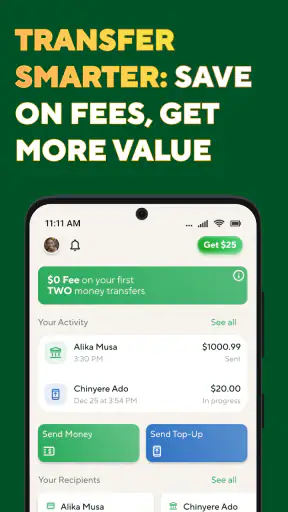



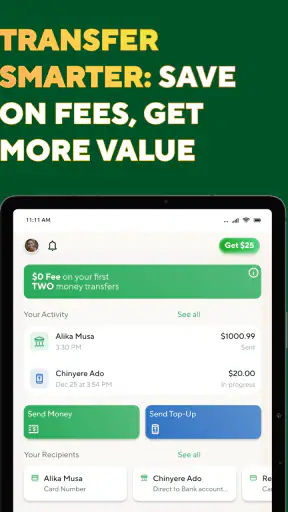
Sending money to family or friends across borders is one of those tasks that looks simple until a small detail stops the transfer. I found BOSS Money Transfer most useful when I treated it less like a casual payment app and more like a careful remittance tool: check the recipient, review the exchange information, confirm the funding method, and keep the transaction details available until the money arrives. That extra care matters because an incorrect name, phone number, or destination detail can create more trouble than the app itself.
Developed by Boss Revolution, this free finance app focuses on international money transfers. It is aimed at people who regularly send support abroad, especially those who want to manage the process from a phone instead of visiting a physical location. The app has been available since November 21, 2016, and its current version is 26.7.1, with support for devices running Android 8.1 or later. Its Everyone age classification also makes it broadly accessible, although the person sending money still needs to meet any identity or transaction requirements shown during use.
What I noticed when a transfer did not go smoothly
The first point where users can get stuck is usually not the transfer button. It is the information entered before that point. Remittance apps depend on details matching the receiving side, and everyday differences such as a shortened first name, a missing middle name, or an old phone number can become important. I would not rush through the recipient form simply because I had sent money to the same person before. A family member may have changed a number, moved, or asked to receive funds through a different option.
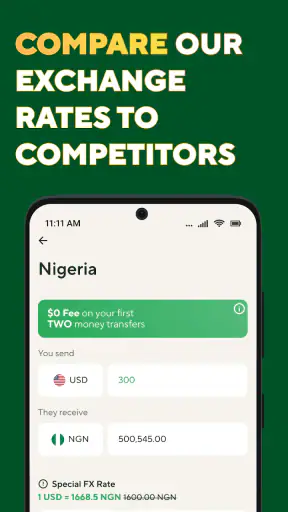
Another common source of confusion is the difference between the amount I enter and the amount the recipient receives. Exchange rates, fees, and the selected destination can affect the final result. BOSS Money Transfer presents itself around low fees and competitive exchange rates, but I still recommend reading the final review screen rather than relying on a general impression. The useful question is not only “How much am I sending?” but also “What will arrive, in which currency, and what total will leave my account?”
The most important habit is to pause on the final confirmation screen. That is where I would verify the recipient’s name, destination, send amount, receiving amount, and any displayed charge before approving. A fast tap may feel convenient, but it removes the best opportunity to catch a mistake. This is especially important when sending a larger amount or using a recipient for the first time.
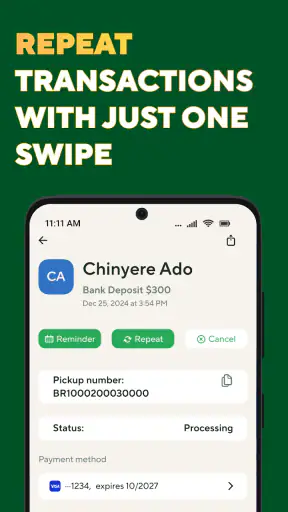
Users can also mistake a pending transfer for a failed transfer. A payment may need processing time, additional review, or action from the recipient depending on the chosen delivery method. Repeating the transfer immediately is risky because it can create a duplicate. I would first check the transaction status inside the app, save any reference information, and look for a clear update before trying again.
Start with a clean recipient record
For repeat transfers, I found that consistency is more valuable than speed. I would keep the recipient’s details in one place and copy them carefully into the app instead of relying on memory. If the app allows a previous recipient to be selected, I would still inspect the details before confirming. A saved record is convenient, but convenience should not turn into automatic approval.
A practical example is sending monthly help to a relative who collects money in another country. The first transfer may take longer because I am checking every field and learning the available delivery choices. Later transfers can be quicker, but I would continue checking the destination and amount because the recipient’s circumstances may change. This approach reduces the chance of sending money to an outdated detail while preserving the main benefit of a mobile service.
Setup checks that prevent avoidable delays
Before using the app for an urgent transfer, I would install it on a supported device, open it when I have a stable connection, and complete the account steps without distractions. The minimum operating system requirement is Android 8.1, so an older phone may need an update or may not be suitable. That requirement is easy to overlook when someone is borrowing a family member’s device or using an older handset kept for travel.
I would also make sure the phone has enough battery and that the app can remain open during the confirmation process. This is not a special BOSS Money Transfer feature; it is simply good practice for any financial transaction. Losing the connection while moving between screens can leave a user unsure whether the request was submitted. If that happens, checking the transaction history is safer than immediately starting over.
Account and identity checks deserve patience. A remittance service may ask for information before allowing a transfer, and the information should be entered exactly as requested. I would use my own current details, avoid guessing at a document field, and stop if a screen is unclear rather than submitting random information. A failed verification attempt can be more inconvenient than spending another minute reviewing the form.
Funding details are another place where preparation helps. The payment source must be available and able to complete the transaction. If a card or account is rejected, I would first check ordinary causes such as an incorrect number, an expired payment method, insufficient funds, or a bank security block. I would not assume that a rejected payment means the recipient information is wrong, because those are separate parts of the process.
Check the total, not just the fee label
When comparing BOSS Money Transfer with a bank transfer, cash service, or another remittance app, I would compare the final amount received rather than looking only at the advertised fee. A service with a small visible charge may still produce a different result if its exchange rate is less favorable. Conversely, a slightly different fee can be worthwhile if the recipient receives more or the process is easier for that particular destination.
That comparison should be made at the moment of sending, not based on an old screenshot or a previous transfer. Currency values move, and the app’s displayed calculation is more relevant than a remembered result. I would also compare the complete total for the exact amount and destination I need, since a result for one country or delivery choice may not represent another.
This is one area where the app’s strong reputation is encouraging without replacing personal checking. BOSS Money Transfer has an average rating of 4.8 from around 57 thousand ratings, and it has passed the one-million-install mark. Those figures suggest that many people find it useful, but they cannot tell me whether today’s exchange result suits my recipient or whether my bank will approve the payment. Reviews are a confidence signal, not a substitute for reading the transaction details.
Make the first transfer a learning transfer
If timing is important, I would avoid making the first-ever transfer at the last possible moment. A small, non-urgent test can help me understand the screens, recipient information, confirmation language, and status updates before a larger family obligation depends on the service. I would only do this when the amount is appropriate for my situation, and I would never send a test transfer to an unverified recipient.
This workflow also answers a question many new users have: can the app replace a bank account? In my view, no. It is better understood as a focused remittance option. A bank may be more suitable for managing a broader range of financial services, while BOSS Money Transfer can be more convenient when the main job is sending money internationally. The right choice depends on destination, delivery needs, cost, and how much control the recipient requires after the transfer.
Recovering when the workflow breaks
If the app closes, freezes, or returns to an earlier screen, I would not assume the transfer failed. First, I would reopen it and inspect the transaction area. If a status or record appears, I would use that information to decide what to do next. If there is no clear record, I would check the payment account for a completed or pending charge before attempting another submission. This simple sequence helps prevent duplicate payments.
For a transfer that remains pending, I would give the displayed process time and keep the reference details. I would avoid promising the recipient an exact arrival time unless the app clearly provides one. If the recipient says nothing has arrived, I would ask them to check the agreed receiving channel and confirm that their details match the transfer. The sender and recipient should compare facts, not rely on assumptions such as “the app must have lost it.”
When a payment is declined, the recovery path depends on where the problem occurred. A payment-source decline points me toward the bank or card issuer. A recipient-detail issue points me back to the information entered. A verification request points me toward completing the requested review accurately. Separating these possibilities is more effective than uninstalling and reinstalling the app after every error.
Reinstalling can also make a user feel as if they are starting fresh, but it does not correct an incorrect recipient, a blocked payment method, or information that needs verification. I would use a restart or update only as a basic technical step, then return to the transaction record and the exact message shown. The current version is 26.7.1, so keeping the app updated is sensible, but an update cannot solve every account or banking issue.
Keep a simple transfer record
For important payments, I would record the date, amount, recipient, destination, and transaction reference in a private note. I would not store sensitive account information in an exposed place, and I would not send screenshots containing personal details through a public chat. The purpose is simply to make follow-up easier if the recipient needs to check a collection or if support asks for identifying transaction information.
This record is especially useful for recurring household support. Instead of asking, “Did that payment go through?” I can check the status and reference, then communicate the relevant details to the recipient. It also helps distinguish a newly submitted transfer from an older completed one. That small organizational step is an underappreciated advantage of using a dedicated remittance workflow rather than handing over cash without documentation.
When the app is not the cause
Sometimes the transfer problem sits outside the application. A bank may block an unfamiliar transaction, a payment provider may require confirmation, or the recipient’s local collection point may not be ready to release funds. Network interruptions can also affect the experience even when the app itself is working normally. I would check these surrounding factors before blaming the interface.
The same applies to exchange-rate disappointment. If the final amount looks different from a number found elsewhere online, that does not automatically indicate an error. A general currency quote may not match the rate used for a real remittance after the service’s pricing and destination details are applied. The meaningful comparison is between the complete figures shown for the same transfer at the same time.
There are also situations where I would choose another option. If I need a full banking relationship, bill management, savings tools, or detailed account administration, a bank app may be a better central tool. If the recipient needs a payment method that BOSS Money Transfer does not present for the selected destination, another remittance provider may fit better. And if I am uncomfortable entering financial information on a phone, visiting a trusted physical service may provide more reassurance, even if it is less convenient.
I would skip this app for a rushed transfer when I cannot carefully verify the recipient or review the final total. I would also avoid treating it as a way to send money anonymously or casually. A finance app deserves the same caution as a bank counter: use accurate information, protect access to the device, and do not share confirmation details more widely than necessary.
Who will get the most from it?
In my experience, the best match is someone who sends international support often enough to value a repeatable phone-based process, but who still wants to inspect each transaction manually. It suits users who care about exchange value and fees, need a mobile alternative to visiting a location, and are comfortable following verification or payment checks when they appear.
It is less suitable for someone who wants every transfer to happen instantly without review. It is also not ideal for a person who expects one app to handle all financial needs. Its strength is focus: sending money across borders. That focus can make the experience easier than navigating a general bank app, but it also means the user should judge it on remittance convenience rather than on unrelated banking features.
My practical verdict after using it
BOSS Money Transfer is a useful choice when careful setup matters as much as speed. I like that it gives mobile users a dedicated way to organize international remittances, and its free price removes a barrier to trying the service. The broad Everyone age rating and support for Android 8.1 or later make it accessible to many phone users, while the sizeable user base and 4.8 average provide reasonable reassurance that it is not an obscure tool.
My recommendation comes with a clear condition: do not tap through the process mechanically. Check the recipient, compare the amount sent with the amount received, confirm the payment source, and use the transaction record when anything looks uncertain. Those habits matter more than whether the app feels fast on a normal day.
For a recurring family transfer, I would use it after completing one careful trial and learning how the recipient and status information are presented. For a one-time emergency payment, I would first confirm that the destination and delivery method meet the recipient’s needs and that my bank will authorize the transaction. If those checks line up, this finance app can be a practical alternative to a traditional remittance visit. If they do not, choosing a bank or another transfer service is the sensible decision rather than forcing the wrong tool to fit.
Overall, I see BOSS Money Transfer as a focused remittance companion, not a complete replacement for every financial service. Its value comes from making a cross-border sending routine manageable on a phone, provided I remain involved in the details. That balance of convenience and personal checking is exactly why I would recommend it to a friend who sends money abroad regularly, while warning them not to confuse a polished workflow with permission to skip the important checks.


